Anomaly Detection Agent
- Isolation Forest
- Z-Score
- Interquartile Range
- Variational Autoencoder

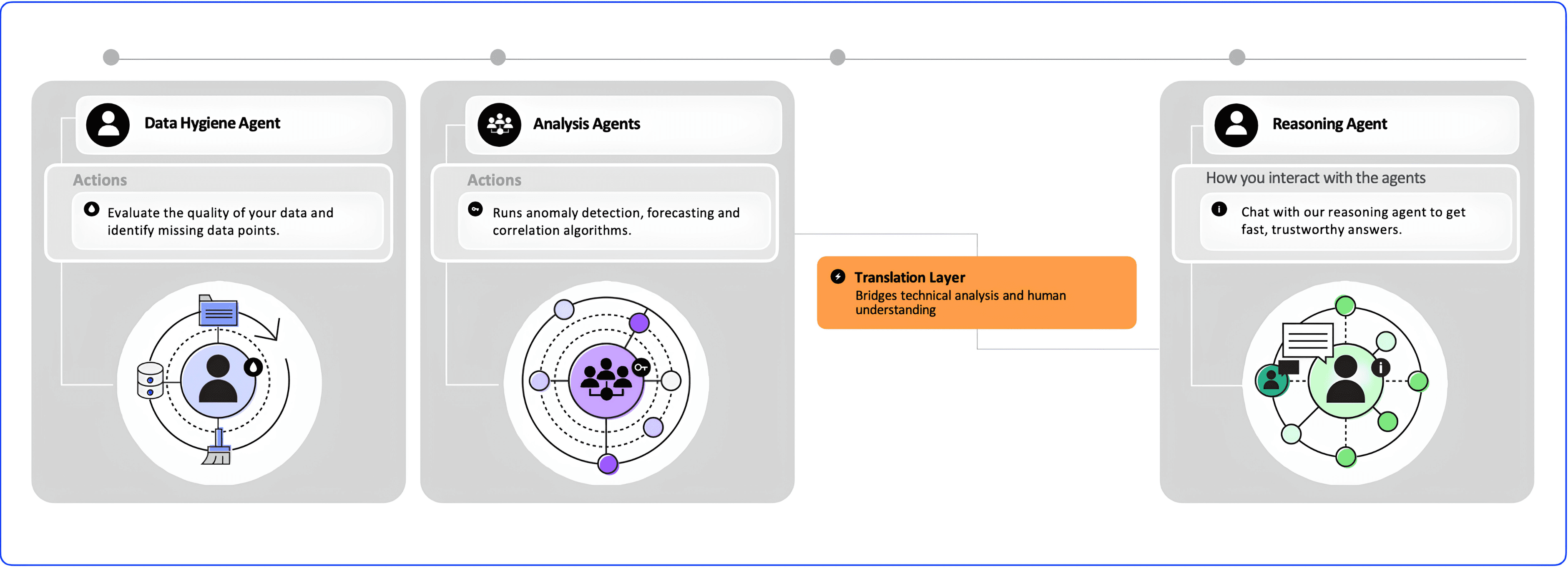
Quickly understand your data by running one or multiple algorithms at once. Grayson TimeSeries runs several algorithms at once and lets you choose the best one.
Grayson TimeSeries expands your capacity by preparing and analysing the data for you- in seconds.
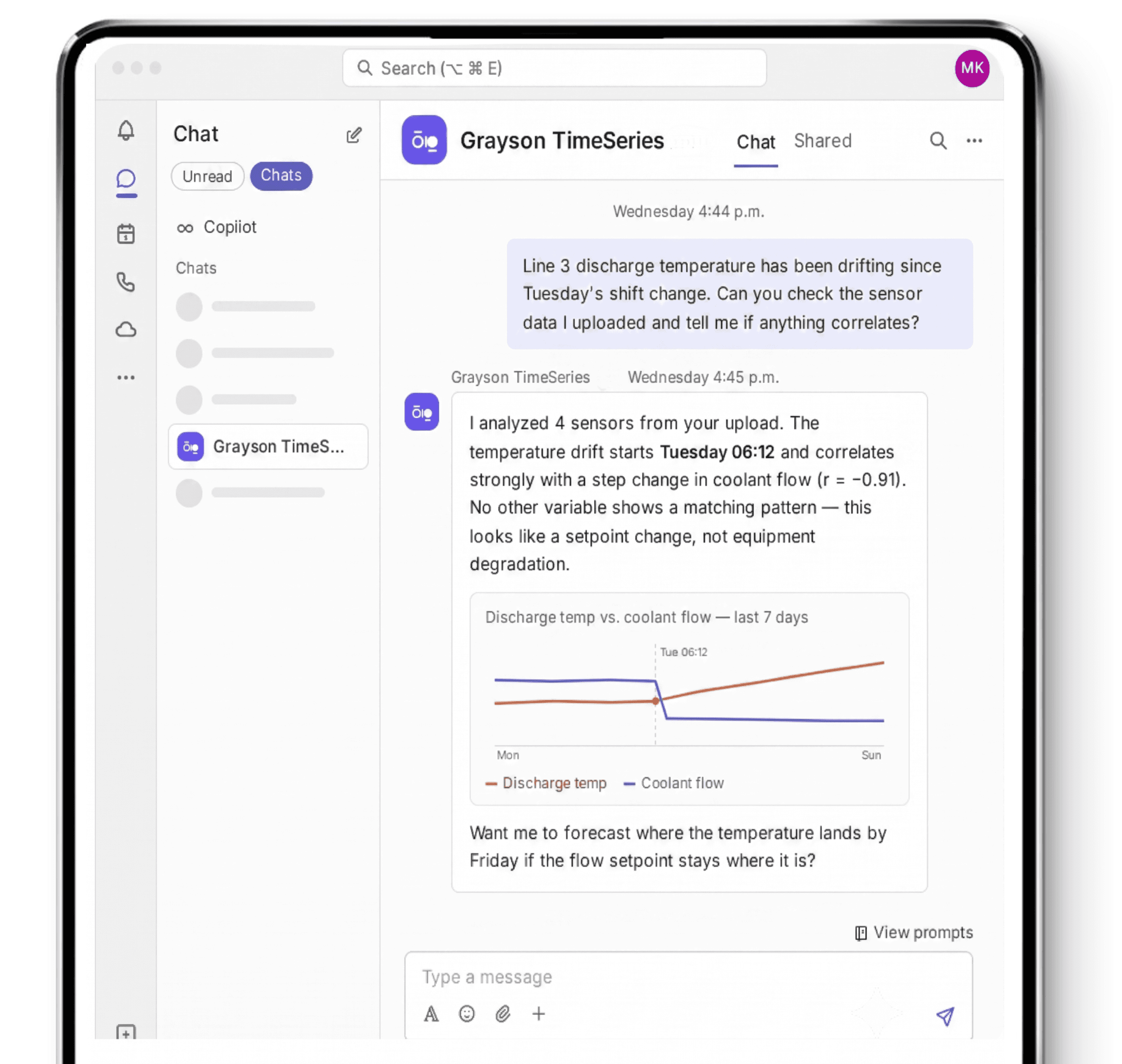
Chat to the reasoning agent via Microsoft Teams to explain the finding and ask questions. Grayson TimeSeries also provides visuals and audit reports of your data to best understand it and present it to your team.
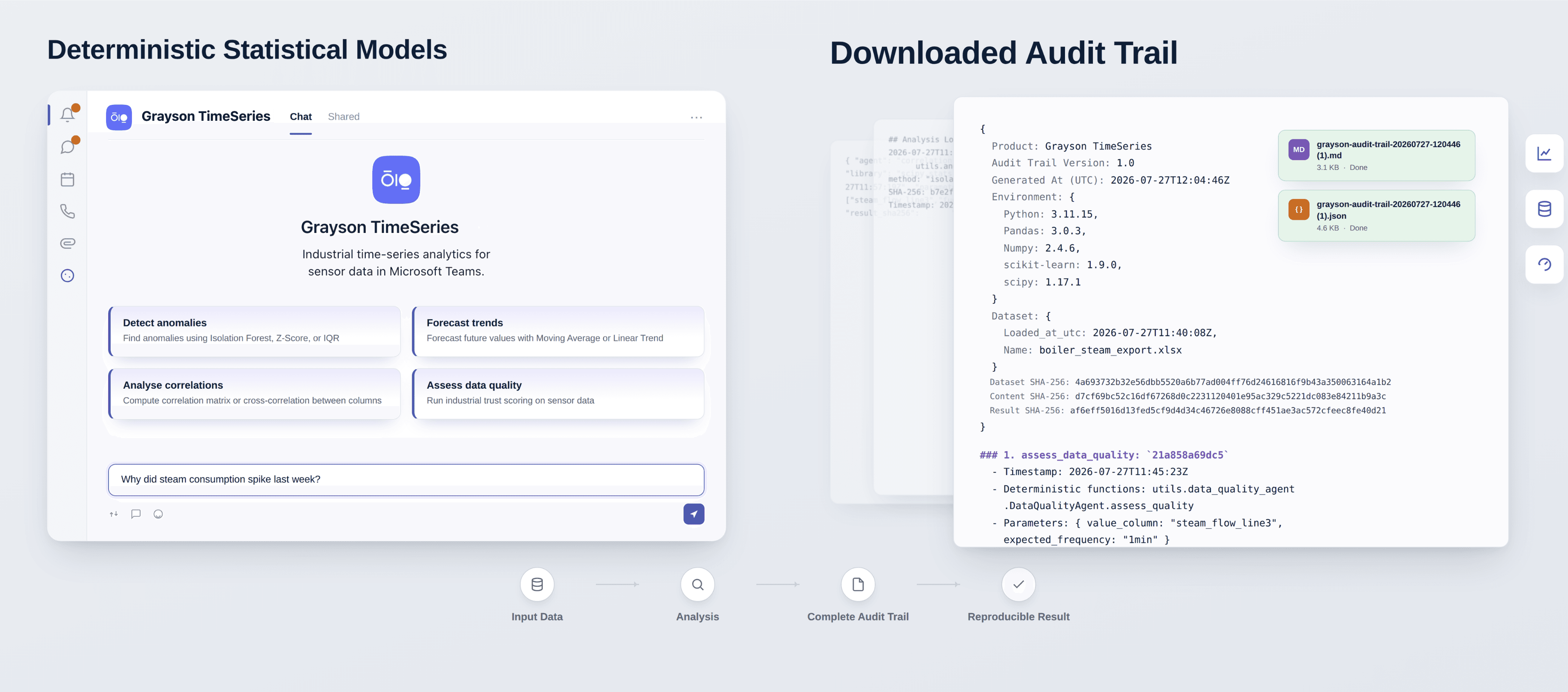
Results are generated by deterministic statistical models.
Structured logs of what ran and when.

Grayson is a Microsoft AI Cloud Partner and part of the Microsoft ISV Success Program. The Grayson TimeSeries app has passed Microsoft’s certification process and is now available directly through Microsoft Marketplace.
Grayson is an AVEVA managed solution provider. Grayson TimeSeries can be integrated to AVEVA CONNECT.
Real stories from teams who streamlined their workflow and delivered more with less.
Grayson TimeSeries is available through Microsoft Marketplace with a free usage limit. You do not need to enter a credit card to add Grayson TimeSeries to Microsoft Teams and get started analyzing your process and plant data. See current usage limits and paid-plan options on the pricing page.
No. Grayson TimeSeries provides a no-code, chat-native interface for analyzing process and sensor data through Microsoft Teams. Upload your data, ask questions, review the analysis, and export or share your findings in minutes.
Grayson TimeSeries complements enterprise analytics platforms by empowering individual engineers and operators to investigate the everyday questions that arise outside established dashboards and automated workflows. It helps you validate a hunch, investigate unexpected equipment behaviour, prepare a report or meeting, and answer ad hoc questions without waiting for someone to configure a new analysis. The analytical models perform the calculations, while the conversational AI explains the findings in plain language.
Yes. Grayson TimeSeries can connect to AVEVA CONNECT and other process historians through a managed integration. Grayson is a Managed Solutions Provider with AVEVA and can work with your IT team to support direct connection to your historian environment. You can first evaluate Grayson TimeSeries using exported historian data in CSV or XLSX format or with our built-in sample data. See how teams use it in mining, oil and gas, metals, pulp and paper, and other industries. If you want a direct historian connection, contact Grayson.
Grayson handles your data in accordance with our Terms of Use and Privacy Policy found in our dedicated Grayson Trust Center.
It depends on your organization’s policies. Microsoft 365 organizations generally allow individual users to add Microsoft-approved Teams apps on their own. However, if your organization has permissions that require approval to add Teams apps, you will need to request approval from your IT Administrator before adding Grayson TimeSeries. You can determine your user permission’s level by trying to add Grayson TimeSeries to Teams.
Grayson TimeSeries supports Microsoft Excel (.xlsx) and Comma-Separated Values (.csv) files up to 10 MB in size per file.
Grayson TimeSeries provides a downloadable audit trail in human-readable Markdown or structured JSON for machine verification. The audit trail records: The dataset name, dimensions, columns and upload time SHA-256 fingerprints for the uploaded file and processed dataset Every analysis performed and its timestamp The analytical functions, algorithms and parameters used The variables and applicable data window Relevant Python and software-library versions A summary and SHA-256 fingerprint of each result Links to corresponding analysis reports, when available The fingerprints allow a reviewer or automated system to confirm that the dataset and analytical result match the versions recorded in the audit trail. The analysis can also be rerun using the recorded data, functions, parameters and software environment. A matching result fingerprint confirms that the result was reproduced exactly.
Grayson TimeSeries is not a general-purpose chatbot or large language model. It is a specialized Microsoft Copilot agent deployed directly in Microsoft Teams to analyze industrial time-series data. Unlike ChatGPT or Microsoft Copilot on their own, Grayson TimeSeries runs statistical and machine-learning models to detect anomalies, forecast trends, and find correlations. Its reasoning-agent layer allows you to ask questions in plain language and receive clear explanations, but Grayson TimeSeries itself is not an LLM. The result is repeatable, auditable analysis supported by visuals, downloadable reports, and a detailed record of the data, algorithms, parameters, and results.
Typically, organizations allow users to add Microsoft approved agents on their own.